
Table of Contents
▼React Native Maps Integration | Xcentric Services
Customised Web Development
- Mar 14, 2024

Set out on a thrilling adventure with Xcentric Services as we explore the seamless integration of React Native maps into your app. Our top-rated React Native app development services in Pakistan and the USA ensure a tailored solution that meets your unique needs. With Google Maps integration and React Native geolocation services, enhance user engagement and streamline navigation effortlessly. As a leading React Native development agency, we are committed to delivering cutting-edge solutions that set your app apart. Join us on this adventure and unlock the full potential of your app with React Native maps. Let's learn how to innovate great things!
Introduction to React Native:
React Native was built by Facebook – and now serves as an open-source framework for creating mobile apps. It allows developers to use JavaScript and React to create Native mobile apps for IOS and Android platforms. The primary purpose of React Native is to streamline the mobile app development process by enabling code reuse across different platforms. Additionally, React Native offers hot reloading, which allows developers to see real-time changes without recompiling the entire app. Because of the substantial time and cost savings, this is a desirable choice for companies seeking to develop cross-platform mobile apps. Its modular and intuitive architecture allows for easy integration of third-party libraries such as Google Maps in ReactJS, enhancing the functionality of mobile apps. With the support of the best React Native app development services, such as those provided by Xcentric Services, businesses can leverage the power of React Native to create innovative and engaging mobile experiences for their customers.
Importance of Maps Integration:
In the realm of mobile app development, integrating maps is becoming increasingly crucial, especially with the rise of location-based services. Maps integration is not just a feature but a strategic imperative. With React Native maps integration, developers can harness the power of mapping services like Google Maps within their applications. This not only enhances user experience but also adds layers of functionality and convenience. Utilizing Google Maps in ReactJS provides accurate geolocation services, allowing businesses to offer location-based features such as store locators, delivery tracking, and real-time navigation. For best React Native app development practices, incorporating maps seamlessly into the user interface is essential, ensuring a smooth and intuitive experience for users. For businesses seeking React Native mobile app development services, integrating maps opens up a world of possibilities. Whether it's displaying nearby points of interest, providing directions, or geotagging user-generated content, map integration enhances the app's utility and value proposition. When considering React Native app development companies near DHA or elsewhere, prioritizing expertise in map integration is key. A skilled React Native development agency like Xcentric Services can optimize the integration process, minimize costs, and maximize the benefits of location-based services.
React Native Geolocation Service:
The React Native geolocation service enables developers to access the device's geolocation data, including latitude and longitude coordinates, altitude, and accuracy. By leveraging this service, developers can incorporate location-aware features into their applications, such as displaying user locations, tracking movements, and providing location-based content or services. This service is essential for creating location-aware React Native applications that deliver personalized and contextually relevant experiences to users.
How to Integrate React Native Maps:
Integrating React Native Maps into your mobile application allows you to incorporate powerful mapping functionalities. Follow these step-by-step instructions to seamlessly integrate maps into your React Native project:
Set Up Your Development Environment:
- For Android:
- Launch Android Studio and configure the Android SDK.
- Ensure that you have the necessary permissions and dependencies configured in your android/app/build.gradle file.
For IOS:
- Install Xcode and ensure it's updated to the latest version.
- Run pod install in the IOS directory of your React Native project to install CocoaPods dependencies.
Link Native Dependencies:
For Android:
- Link the library to your Android project.
- Ensure that your AndroidManifest.xml file includes the necessary permissions for accessing the device's location services and Google Maps API key.
Configure API Keys:
- Your API key should be included in the AndroidManifest.xml file for Android.
- For IOS, add your API key to the AppDelegate.m file or the .plist file.
Initialize Map Component:
Test Your Integration:
Set up your development environment as per the following instructions:
Install React Native Maps Package:
Start by installing the React Native Maps package using NPM or Yarn. Run the following command in your terminal:

After installing the package, link it to your React Native project. Run the following command to link the package:
To use Google Maps in your application, you need to obtain API keys from the Google Cloud Platform Console. Configure the API keys for both Android and IOS platforms.
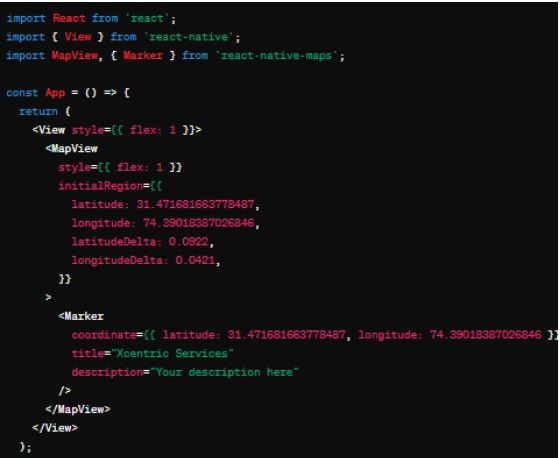
Import the MapView component from react-native-maps in your JavaScript file where you want to use the map. Add the MapView component to your JSX and customize it with desired props such as initial region, markers, and overlays.
Run your React Native application on both Android and IOS devices or emulators to test the integration of React Native Maps. Ensure that the map displays correctly and functions as expected.
Challenges and Considerations:
Integrating maps into React Native applications comes with its own set of challenges and considerations. One major challenge is ensuring cross-platform compatibility between IOS and Android. Differences in APIs and performance can lead to discrepancies in functionality and user experience. Additionally, managing complex map interactions, such as gestures and overlays, requires careful attention to detail to ensure smooth navigation and responsiveness across devices. Other considerations include data privacy and security, especially when dealing with sensitive location information. Developers must adhere to best practices for handling user data and permissions to maintain trust and compliance with regulations like GDPR.
Best Practices and Real-world Examples:
To ensure successful map integration in React Native apps, developers should follow best practices such as modularizing code, optimizing performance, and thoroughly testing across different devices and scenarios. Using third-party libraries and APIs, like Google Maps and Mapbox, can streamline development and provide additional features and customization options. Real-world examples of effective map integration can be found in various navigation and delivery apps, where maps play a central role in providing accurate location information and route optimization. Companies like Uber and Airbnb have mastered map integration to enhance user experience and provide valuable services to their customers.
Future trends in React Native Map Integration:
Looking ahead, the future of React Native map integration is promising, with advancements in technologies like augmented reality (AR) and machine learning (ML) opening up new possibilities. AR-based navigation apps could revolutionize the way users interact with maps, overlaying digital information onto the physical world in real time. ML-powered algorithms could offer personalized recommendations and predictive insights based on user behavior and location data, further enhancing the utility and value of map-integrated applications. As React Native continues to evolve, developers can expect more tools and frameworks to streamline map integration and unlock innovative features for next-generation apps.
Xcentric in React Native Maps Integration:
At Xcentric, we excel in leveraging the power of React Native maps to enhance the functionality and user experience of mobile applications. Our team of experts specializes in the seamless integration of Google Maps within React Native apps, utilizing the full potential of the React Native geolocation service. We offer top-notch mobile app development services in the USA and Pakistan. With a focus on mobile app integration and development consulting, Xcentric ensures that your app not only meets but exceeds industry standards. Whether you're looking to build a navigation app, location-based service, or any other map-integrated application, our React Native consulting services provide guidance and expertise every step of the way. Partner with Xcentric for the best React Native app development experience and unlock the full potential of React Native maps integration in your mobile applications.

Share



Want To Increase Your Ranking On The Search Engines?
Get In Touch With Us!
What To Read Next?
Set out on a thrilling adventure with Xcentric Services as we explore the seamless...
Xcentric Team
31 MONTHS AGO

Apps built on the React Native Platform have brought the app development industry...
Xcentric Team
35 MONTHS AGO

Every day, the digital world is advancing towards new innovations; among them is Web...
Xcentric Team
44 MONTHS AGO