
Table of Contents
▼
The need for faster, more efficient remote teamwork to improve security and cost control has led businesses across America to rethink their IT approaches. Most businesses, however, rely on slow, cost-inefficient IT methods, using either old software, old servers, outdated software, expensive servers, or a combination of all four. For this reason, businesses often ask, 'What is cloud migration and do we need it?'
There is no longer a veil of secrecy regarding the cloud because it has evolved from an IT Foundation to a business Foundation. It has become the basis for an efficient user-center business. It has also become the cornerstone for operational efficiency and business scalable growth. With the flexibility of the cloud, businesses no longer need to worry about physical hardware or the cost of maintaining a data center. According to analyst firm Gartner Cloud, spending across the board is expected to reach $723.4 billion by the year 2025. Research by Flexera has shown that 94% of signaled interest have cloud services.
For businesses of all sizes, the opportunity to reduce risk through cloud partnerships and, for the first time, to grow operations has become boundless. This is the value of what cloud migration is to Xcentric Services.
What Does Cloud Migration Mean?
After we define cloud migration, it is important that we understand it easily. Cloud migration is the process of transferring your files, applications, and IT from your local hardware (like computers and servers) to the Internet. (e.g., Cloud).
An example of cloud migration is transferring your documents to the digital cloud. Previously, your files were saved in filing cabinets located only in your local place of work, but now it is possible to access your workplace digitally from anywhere.
Rather than have everything on-premises, they can run them all in The Cloud and have them managed cost-effectively on another off-site line, for example, using Amazon Web Services, Microsoft Azure, or Google Cloud.
Cloud migration can involve:
Transferring files and databases (also known as cloud container migration)
Deploying cloud-based software in place of on-premise software
Online computing resources and online servers
Facilitating cross-geographic remote access
Replacing on-premises computing resources and servers with off-premises cloud Resources and Services.
Cloud migration is not an exercise in moving to the newest or latest technology, but an opportunity to improve operations, reduce risk, and keep the business on a growth path in the future without continually throwing resources into infrastructure cloud migration.
Business Component | What Moves | Business Benefit |
Business Data | Files, customer records, databases | Easier access and backup |
Software Applications | Email, CRM, accounting | Better collaboration and updates |
IT Infrastructure | Serves, storage, computing power | Lower hardware maintenance costs |
Communication Tools | VoIP, messaging systems | Improved remote work support |
Security Systems | Monitoring and access controls | Bettrotection and compliance |
An important aspect of this is cloud data migration. This is known as the transfer of business records from on-site systems to cloud storage or cloud databases. For companies that are large enough to record, store, and maintain customer information, as well as companies with a large compliance burden, careful planning is necessary to ensure that data is migrated appropriately to avoid loss, corruption, and business process disruption.
In the most common case, companies will migrate to SaaS (Software as a Service). Here, the main difference is that employees will access the software through the cloud as opposed to it being installed locally and maintained on-premises. A common example is Microsoft 365 or Salesforce.
The next big change is IaaS (Infrastructure as a Service). This is a big shift from owning and operating on-site servers to having your cloud service provider do this for you.
Types of Cloud Environments
Every company moves to the cloud differently. This is the case because the right cloud solution varies by company according to the core business, security, compliance, and/or operational requirements.
Public Cloud
A public cloud environment is one that is characterized by shared infrastructure that is deployed by cloud service providers. Examples include the likes of AWS, Azure, and Google Cloud. In this case, businesses are invoiced according to a pay-as-you-go basis. This means that businesses are charged only for the resources that they consume.
This is generally an attractive offering because it limits large up-front capital expenditure (CapEx) on hardware. Additionally, it provides a shift from CapEx to predictable operational expenditure (OpEx).
Private Cloud
Private clouds are business-exclusive. They are for companies that need extra control, customization, and security, for highly regulated industry firms that need to comply with regulations, with sensitive information, e.g., HIPAA, SOC 2, GDPR.
Hybrid Cloud
Hybrid clouds integrate in-house and cloud services. Some functions remain in-house, while others are in the cloud.̶
This is likely the most convenient arrangement for companies that are scaling. Flexera shows that 73% of companies function in hybrid clouds.
Multi-Cloud
Multi-cloud is when companies utilize different cloud providers. This may involve employing a cloud supplier for services, cloud analytics, and a different supplier for backup services. This reduces the risk of becoming reliant on a single supplier.
How Does Cloud Migration Work?
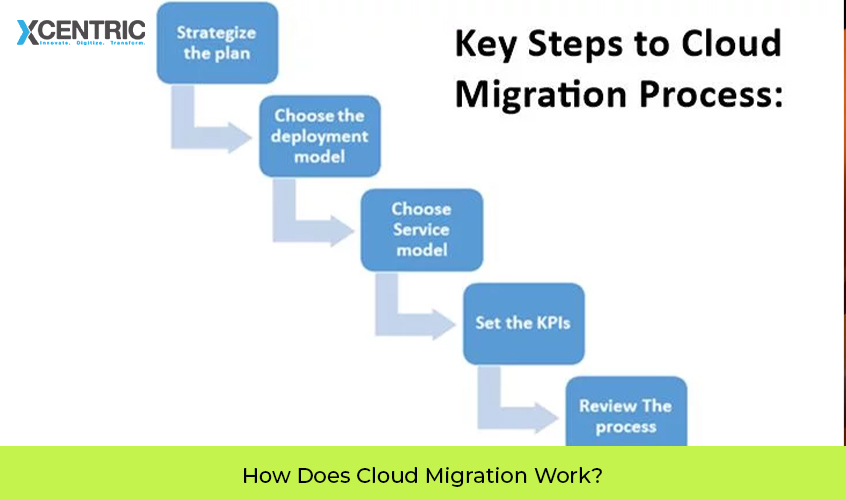
Have in mind that the conditions of every cloud migration are different. The most suitable step will depend on the business's aims, the current state of the systems, costs, and the duration the business is willing to wait.
Migration Approach | Plain Business Meaning | Best For |
Rehost | Move systems as they are | Fast migrations |
Replatform | Make small improvements during migration | Better performance with low disruption |
Refactor | Rebuild systems for cloud efficiency | Long-term scalability |
Repurchase | Replace old software entirely | Outdated applications |
Retain | Keep some systems on-premises | Compliance or operational needs |
Retire | Remove systems no longer needed | Reducing complexity |
Rehost (Lift and Shift)
Many businesses first ask what lift and shift cloud migration is because it is one of the fastest approaches. Generally known as what is rehosting in cloud migration, this technique involves moving existing systems to the cloud with minimal changes.
Replatform
Businesses now looking for a middle-ground approach often ask what replatform in cloud migration is. A platform is built around a core system, allowing for better performance in the cloud with a more efficient distribution of resources.
Refactor
Businesses now asking what refactoring is in cloud migration are interested to know that this involves redesigning a core system with a more cloud-friendly design. This may take more time and investment now, but it often results in improved performance, flexibility, and scalability.
Repurchase
This approach helps to move businesses to a more modern cloud-enabled platform. It helps many businesses replace their outdated legacy systems (for example, accounting or CRM systems) with Software as a Service alternatives.
Retain
This indicates that certain systems are kept on-premises for operational, compliance, or financial needs.
Retire
Migration is often a good time to eliminate redundant software systems and unsupported legacy systems.
What is a Cloud Migration Strategy?
Before making any move, companies need to ask one important question, what is a cloud migration strategy? A migration strategy is a high-level business plan that helps to make a decision that concerns:
A system that needs to be moved
A system that can be kept
An available cloud environment
Management and mitigation of risks
A proper timeline
Transitional operational efficiency
Without a plan, migrations devolve into an expensive, chaotic, and disruptive endeavor. IDC surveys indicate that the majority of cloud projects go over budget, as a result of planning and execution that is poorly defined and vague.
A good strategy starts with what is a cloud migration assessment. The goal of this assessment is to take a comprehensive review of the infrastructure as a whole, software, workflow congestion, operational risks that relate to security, and goals that the business wants to achieve in the future.
Xcentric Services believes that cloud migration planning needs to be centered on an understanding of the business and not solely the technology, as in the assessment of operational shifts throughout the business, the need for remote access, the adjustments of business strategy in order to comply as needed toward a scalable goal, and the Total Cost of Ownership (TCO) in the long run.
What is a Cloud Migration Plan?
After the strategy is in place, the next step for the companies is to move into the planning of the execution. This begs the question, what is a cloud migration plan?
A migration plan describes the order of events that will occur during the move.
Planning Area | Why It Matters |
Migration Order | Reduces operational disruption |
Downtime Planning | Minimizes the impacts on business |
Security Controls | Safeguards sensitive information |
Backup Procedures | Allows issues to be corrected and ensures recovery |
Rollback Plan | Allows reversal if needed |
Employee Training | Facilitates the move |
A solid migration plan progresses business operations during the move, maximizes employees' efficiency, and minimizes the frustration of employees during the transition.
Robust planning that avoids disruption also includes a rollback plan to manage the risks of unexpected events during the migration.
This is when the experience of migration specialists provides the most value to businesses. Internal teams are certainly knowledgeable of the business, but they also frequently lack the relevant skills to efficiently arrange migration sequencing with security verification, vendor management, and cross-post acquisition settlement.
When Do the Clouds Become Necessary for the Business?
This example poses the business paradigm of the migration after making the workflow computer-centered. If even a couple of the following circumstances resonate with you, you are probably well past the point of migration.
1) Escalating IT Expenditures
Many businesses carry out expenditure budgeting and planning without effectively improving operations through upgraded or replacement maintenance and repairs, licensing, and/or emergency operational support.
A migrational shift to the cloud supplements the absence of costly, inflexible cloud spaces and disparate, costly, and unpredictable cloud inflexible spaces with cloud substitutive operational expenses.
2) Lack of Remote Access
When there is a lack of reliable remote access, productivity drops rapidly, more than dismally. A cloud operational shift supports the reliability and security of remote access, which alleviates the outdated(i)e/office-based virtualization support.
3) Accelerating Business Growth and System Idle
Growth creates multiple points of conflict in operational and customer traffic. This is further aggravated by systems that lack performance, capacity, and tolerance. A cloud framework provides a pivot to the intersection of systems, capacity, and performance.
4) Inordinate Time Spent on IT Maintenance
Any time spent by the business owner on the maintenance failures of the system's framework and software is unproductive. With cloud migration, employees can spend a limited amount of time on maintenance. Chief executives can allocate time to core functions, clients, and growth, and avoid hours of IT crisis management.
5) Security or Compliance Gaps have been Exposed
Recent ransomware attacks, security issues, or compliance audits have been the impetus for many organizations to invest in modernization. Cloud vendors have security, surveillance, and compliance support that many small and medium-sized businesses cannot afford or do not know how to implement.
6) Competitors are Operating Faster
Business managers now fully understand that the speed of operation is correlated to the flexibility of technology. Cloud infrastructure is one of the reasons your competitors are achieving greater speed with their market offerings, improved remote workforce support, and greater adaptability to changing market conditions.
7) Out-of-Date System
From a business systems point of view, unsupported systems are an operational risk, and software systems can become out of date. Vendors eventually stop system support, which leads to a greater system interoperability and security gap.
Legacy systems are being modernized via cloud platforms that offer flexible support and improved operational safety.
Benefits of Cloud Migration for Businesses
Cloud environments are essential for organizations with broad geographic collaboration, including growth that exceeds acquisition consolidation. Cloud technology makes cloud environments, improved support for collaboration, operational consolidation, and a lower cost of operation easy to achieve.
Business Outcome | Benefit |
Remote accessibility | Improved team productivity |
Scalability | Faster growth without infrastructure delays |
Better security | Lower operational risk |
Faster updates | Reduced downtime and maintenance |
Lower infrastructure costs | Reduced hardware spending |
Large infrastructure investments are no longer necessary, so companies can update and improve growth technology. Additionally, cloud migration provides businesses with the ability to improve their speed of operation and increase operational flexibility.
Moving clients from obsolete systems earns clients' points for faster operations, better communication tools, less downtime, and many positive indirect effects.
However, savings from the cloud may not justify the case for the cloud. Rational decisions, based on potential organizational needs and future business goals, may justify the appx. costs for operational, protective, and business goals.
What to Watch Out For When Implementing Cloud Migration
The cloud provides many positive business effects, but poor decisions may have unnecessary, negative impacts.
One of the primary effects is novel expenditures. Investment costs for the cloud and the purchase of networking devices may be lower than for traditional models, but poor decisions with team resource management can lead to substantial new operational costs.
The improper decision of business cloud transfer can also be detrimental. Faster transfers can lead to significant downtime and operational disruptions. The absence of the cloud may result in an inability to use the services at a later time if the cloud is purchased from the same manufacturer. Requirements of privacy, including those regarding self-sovereignty, may not be met. The migration of businesses into the cloud is essential, phased, carefully, and planned.
Why use Xcentric for Business Cloud Migration
Cloud transfers for businesses are essential. Most companies do not want to do the process by themselves. Xcentric provides cloud services for businesses, guiding first, second, and last cloud transfers and ensuring smooth business processes during the transfers. As a result, businesses can align their cloud strategy with their business goals.
This means:
Analyzing existing systems and operational deficiencies
Creating tailored migration plans to fit growth objectives
Minimizing downtime during migration
Facilitating blended multi-cloud services
Performing migration-specific restructures and support
Preventing the ballooning of infrastructure costs for businesses
From a phased hybrid configuration to a full cloud transformation, Xcentric streamlines the process so management can focus on their core business functions. If your systems are impeding your growth, raising costs, or causing operational bottlenecks, it is time to consider professional cloud migration services from Xcentric Services.
Frequently Asked Questions (FAQs) About Cloud Migration
How would you describe cloud migration in the simplest terms?
Cloud migration is the process of shifting an organization’s systems and data from on-premise servers to a cloud infrastructure. This transformation allows for greater business agility, a reduction in reliance on physical infrastructure, and improved remote accessibility.
What is the average time it takes to migrate to the cloud?
This varies from business to business. For some small businesses, the process can take a few weeks. Larger businesses may take several months because the migration is performed in stages.
What is the average cloud migration cost?
The migration cost can range from several thousand dollars to several million, depending on a variety of factors such as the size and complexity of the infrastructure and the depth of the cloud offering to be used.
How secure is my business data going to be during the migration?
As long as the process is correctly implemented and planned, it is safe to migrate. Major cloud services invest in the infrastructure to secure, monitor, and support an adequate level of compliance.
What is the difference between cloud migration and cloud backup?
Cloud backups preserve your data in case you need to retrieve it later. Cloud migration is the total transfer of all your company's functions (like apps and processes) to the cloud.
Can my business stay on-premises partially?
Certainly. A hybrid cloud strategy is the migration of some business functions to the cloud, leaving the remainder on-premises. This model runs your business with an on-premises component with the least amount of disruption.
What is a cloud migration strategy?
This covers determining which systems will move, the migration order, the environment that will host the applications, and the risk mitigation process.
Do small businesses need cloud migration?
Absolutely. Cloud migration is imperative for small businesses. The benefits of cloud migration for small businesses include lower IT maintenance costs, the ability for staff members to work remotely, greater scalability, and enhanced operational flexibility.

Share



Want To Increase Your Ranking On The Search Engines?
Get In Touch With Us!
Trending Blogs
Digital Marketing...
Xcentric Team
7 MONTHS AGO


What To Read Next?

For owners and managers of dental clinics in Lahore, here is a critical fact you...
Xcentric Team
7 MONTHS AGO

The Middle East e-commerce industry is rapidly growing due to increased digital acceptance, mobile-first consumers...
Xcentric Team
8 MONTHS AGO

These days, the e-commerce industry is growing at an exponential rate. With the rise of...
Xcentric Team
8 MONTHS AGO